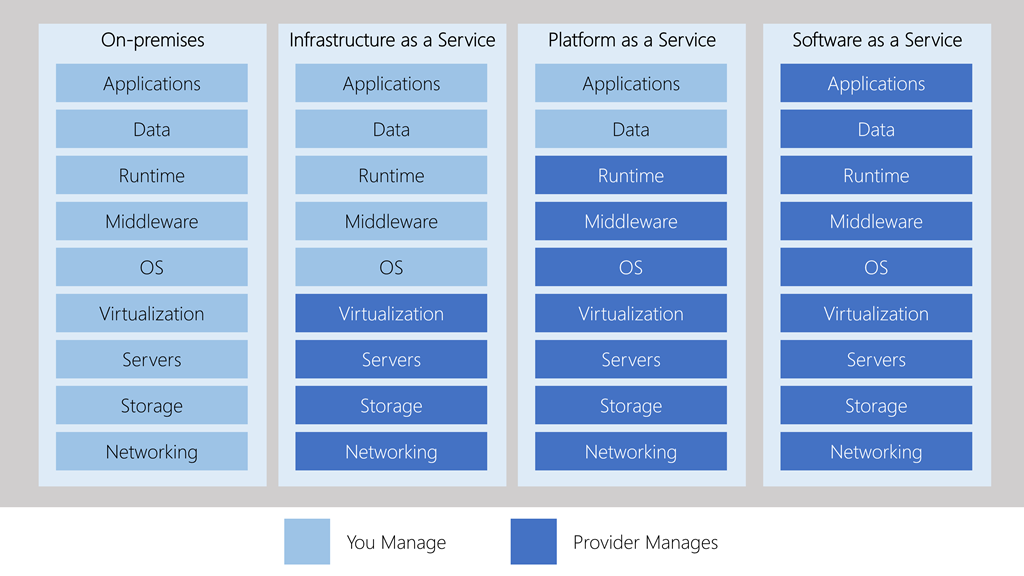
What is Microsoft 365 Microsoft 365 administration October 28, 2020December 4, 2020 maher islaieh introduction Before diving inside Microsoft 365 services, we may have some questions like :What is Microsoft 365 and what is office 365 ?What is benefit of using Microsoft 365What Apps included in Microsoft 365 And how much does it costSince everything is in cloud : how to secure my identity and how to secure my informationIf I have local Microsoft infrastructure : how can I get benefit of both : local Microsoft on-premise and cloud Microsoft 365 How to fully migrate from on-premise Microsoft infrastructure to Microsoft 365 What is prerequisites of using Microsoft 365 In network pioneers : we will join you Through this course to answer these questions and also master Microsoft 365 microsoft cloud models Microsoft cloud models is divided into three categories : Software as a serviceKnown as : SaaSSoftware that’s available via a third-party [Microsoft] over the internet.Fully managed in cloud : computing , Data , everything in MicrosoftCustomer responsibility is ONLY to use softwaretarget customer, who is looking to simply use this software without bothering himself of anything elselike Microsoft 365 :which include office apps , project , power apps ,… etcPassS :Platform as a serviceKnown as : PaaSPlatform as a service (PaaS) is a complete development and deployment environment in the cloud,target developer ,like azure app services, just create machine with platform installed [SQL or SharePoint for example]Infrastructure as a serviceknow as Iaas cloud-based services, pay-as-you-go for services such as storage, networking, and virtualizationtarget sysadminlike Azure VMscould have another aspect like DRaaS below comparison between Iaas & PaaS & SaaS with on-premise network For Better View > Open Image in different TAB